When most marketers think about SEO, they usually think in terms of keywords, rankings, backlinks, and content creation. But there’s a lesser-known truth that’s quietly reshaping what gets visibility on search engine results pages (SERP): Google doesn’t index your entire page. It only indexes the part it thinks matters most, your main content.
And if Google misidentifies what is most important, or fails to find it at all, your SEO efforts won’t just underperform. They’ll be wasted.
This is why Google’s Gary Illyes recently took the stage at the Search Central Live event to walk through how Google identifies and processes the “main content” (MC) of a web page before deciding whether to index it.
It wasn’t a casual update; it was a deliberate effort to make sure marketers understand what Google is looking for and what’s getting filtered out behind the scenes (source).
For in-house marketers and content teams, this is mission-critical. Not because Google made a significant algorithm change, they didn’t, but because this confirms what Google’s systems have been doing all along: prioritizing only the content that directly serves the searcher’s intent. And quietly discarding the rest.
In this article, we’ll break down:
- What Google actually defines as “main content”
- How its systems find (or fail to find) it
- Why even well-optimized pages might not get indexed if the MC is unclear
- And how to adjust your site’s structure, design, and content to align with how Google really sees your pages
If your business depends on organic search—and you’re investing time or money into content marketing—this is information you can’t afford to miss.
What Is “Main Content”?
When Google talks about “main content,” it’s not being vague. It has a precise definition, one that comes directly from its Search Quality Evaluator Guidelines, and it’s central to how the page gets evaluated and ultimately indexed.
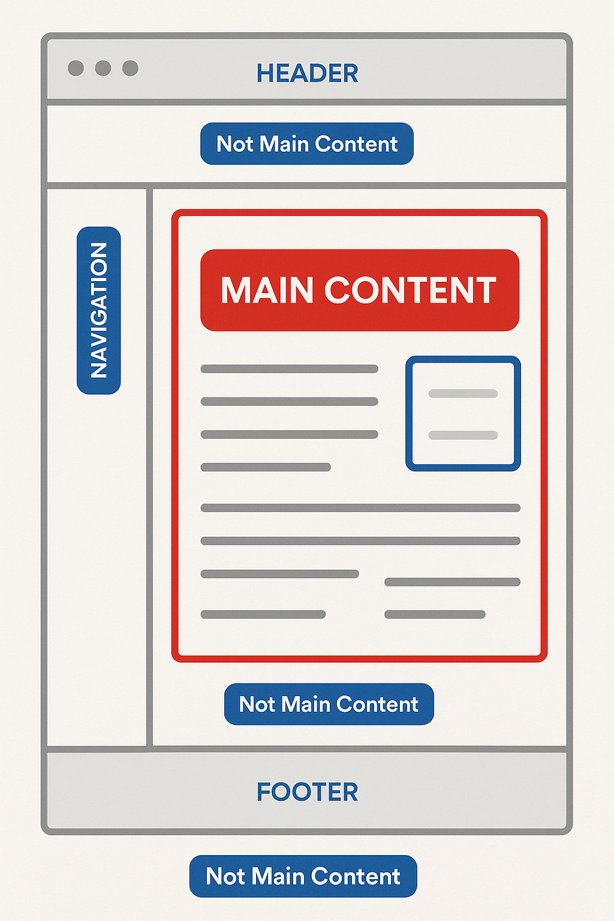 In plain terms, the main content is the part of the page that fulfills the user’s intent. It’s the answer, the value, the reason someone came to your site in the first place. It’s not your navigation bar. It’s not your footer. And it’s definitely not your sidebar with latest posts and pop-ups.
Google defines it as the “part of the page that helps it achieve its purpose.” That could be:
- The body of a blog article
- A product description and reviews on an e-commerce page
- A video with a transcript and user-generated comments
- A comparison chart, interactive calculator, or explainer widget
- Even User Generated Content, link forum threads, customer reviews, or even a Q&A section, if that’s the core experience the user expects
This concept has been embedded in Google's guidelines for years. However, what Gary Illyes clarified at the Search Central event is that Google’s systems now consider that main content as the primary focus for indexing decisions.
In other words: if it doesn’t clearly contribute to fulfilling the user’s need, it’s not going to help you rank, and it may not even get indexed at all (source).
The Main Content vs Everything Else
To Google, the web page is a composition of multiple content zones. And it’s ruthlessly efficient about separating the signal from the noise. Here’s how it breaks it down:
|
Page Area |
Indexed? |
Weight in Ranking |
|
Main Content |
Yes |
High |
|
Header / Footer |
Sometimes |
Low |
|
Navigation Links |
Sometimes |
Low |
|
Sidebars / Widgets |
Rarely |
Very Low |
|
Ads / Promos |
No |
None |
If your most valuable, keyword-rich, user-centric content is not in the part of the page Google considers “main,” you’re basically asking Google to ignore it.
Why This Matters to Marketers
Here’s the takeaway: you don’t just need great content, you need it to live in the right place. That means:
- Structuring your website’s code so that the main content is central and clearly defined
- Minimizing visual clutter and distractions around your core message
- Avoiding tactics that bury content inside accordions, tabs, or late-loading JavaScript (JS)
Main content is the payload. Everything else is overhead. And Google’s getting better at tuning out the overhead.
How Google Detects Main Content
Knowing that Google only indexes the “main content” (MC) of a page is one thing. But if you don’t understand how it detects that main content, you’re still flying blind.
Google doesn’t rely on guesswork or a visual scan like a human would. Its systems use a combination of HTML parsing, layout recognition, semantic analysis, and JavaScript rendering to identify which part of your page delivers value, and which parts are just supporting structure.
Let’s walk through the process.
Parsing the Page Structure
When Google’s bot crawls a page, the first step is to analyze the HTML and document object model (DOM) structure. It breaks the page down into elements and tags to understand what’s where: header, body, navigation, footer, sidebars, and so on.
HTML tags matter, but not as much as you may assume. Google doesn’t blindly trust that the main tag <main> contains the MC just because the tag says so. Instead, it uses contextual clues from the structure, layout patterns, and surrounding elements of your website’s page to determine what’s central to the page's purpose.
In other words, semantics (meaning) is greater than syntax (elements). The visual and structural prominence of the content matters more than your markup.
Rendering and Visual Context
Google’s crawler is no longer just a bot reading code; it uses a version of Chrome to render the page as a user would see it.
This allows Google to: 1)identify late-loading content (i.e., JS-heavy pages) 2) see what’s hidden in tabs, accordions, or toggles, and 3) detect whether content is obscured or dynamically inserted
If your “main content” doesn’t appear clearly and promptly when the page loads, or if it’s pushed down the page by popups, carousels, or other distractions, Google may not be treated as the core content at all.
Analyzing Content Relationships
Google’s systems also assess how different parts of a page relate to each other:
- Is the content in this section relevant to the page title and meta description?
- Are there internal or external links pointing to this section of the page?
- Do other pages in the website reinforce this area’s importance through anchor text or site architecture?
This is where semantic SEO starts to shine. If your internal links, headings, and contextual placement reinforce the purpose of your main content, Google is more likely to understand and prioritize it.
Here’s an example:
Let’s say your company manufactures and sells industrial water filtration systems, and you’ve written a guide called:
“How to Choose the Right Water Filtration System for Your Facility.”
This is your cornerstone piece of content for buyers who are early in their research phase. Here's how semantic SEO helps Google recognize this content as the main content that should be indexed and ranked.
Internal links will reinforce the relevance of the
Internal Links Reinforce Relevance
Across your website, you have supporting pages like:
- “Reverse Osmosis vs. Carbon Filtration: What’s the Difference?”
- “Understanding Flow Rates in Water Treatment”
- “5 Signs It’s Time to Upgrade Your Filtration System”
Each of those articles includes internal links that say things like:
“If you’re still evaluating which system type is right for your facility, check out our complete buyer’s guide.”
This consistent internal linking indicates to Google that this page is the hub, the most authoritative and comprehensive resource on the topic. Google perceives this as a strong signal for indexing and ranking.
Context Confirms Intent
The buyer’s guide opens with a clear, concise intro:
“Selecting the right water filtration system can have a major impact on operational efficiency, safety, and compliance. This guide is designed to help facilities teams and engineers make an informed choice based on water conditions, volume, and use case.”
This tells Google (and human readers) that this content exists to solve a specific problem for a defined audience. It also lives high in the page hierarchy, is placed within the <main> HTML tag, and isn’t surrounded by noisy popups or irrelevant sidebars. Google sees it as the central purpose of the page.
Discarding the Noise
Gary Illyes noted that during processing, Google throws away content it considers low-priority or irrelevant, even if it exists within the body of the page. This includes:
- Navigation elements
- Repetitive widgets or footers
- Ads and promotional overlays
- Bloating structured data or markup that doesn’t serve the user
In short, Google is filtering your content. It’s not indexing your whole page. It’s indexing what it determines users actually care about.
Why This Matters to You
If your goal is to rank in search and drive real business results from that traffic, you need to make sure that the content you want indexed is clearly the star of the page and that nothing gets in the way of Google seeing that.
This doesn’t mean you should strip down your site or make it visually boring. It means designing and structuring your pages so that the main content is unmistakable to both users and search engines.
Common Pitfalls That Hurt Main Content Detection
It’s easy to assume that if your content looks good to you and delivers value to the reader, Google will naturally see it the same way.
Unfortunately, that’s not always true.
During the indexing process, Google’s systems actively filter out, or “discard”, portions of a page that it considers low-priority or irrelevant. When that filtering happens to your most valuable content, it can mean the difference between being discoverable in search and being invisible.
Many of the problems that interfere with main content detection aren’t caused by bad intentions or lazy SEO. They’re the result of design decisions, technical setups, or content strategies that unknowingly send the wrong signals to search engines.
The “Soft 404” Problem
One of the most common and damaging issues is the soft 404. This occurs when a page returns the correct 200 “OK” status code but, in practice, offers almost no substantive value, think placeholder pages, thin content, or copy that’s so vague it doesn’t satisfy any real search intent.
To a human, this might feel underwhelming; to Google, it’s essentially a dead end. And once Google labels a page as a soft 404, it treats it as though it doesn’t exist, removing it from the index entirely.
For marketers, this means you can’t rely on simply having a live URL with some words on it. Your main content has to be robust, purposeful, and relevant from the first moment Googlebot encounters it.
Example of a Soft 404 Problem
Imagine a company that sells replacement HVAC filters. They have a product URL like:
companyurl.com/filters/size16x25x1
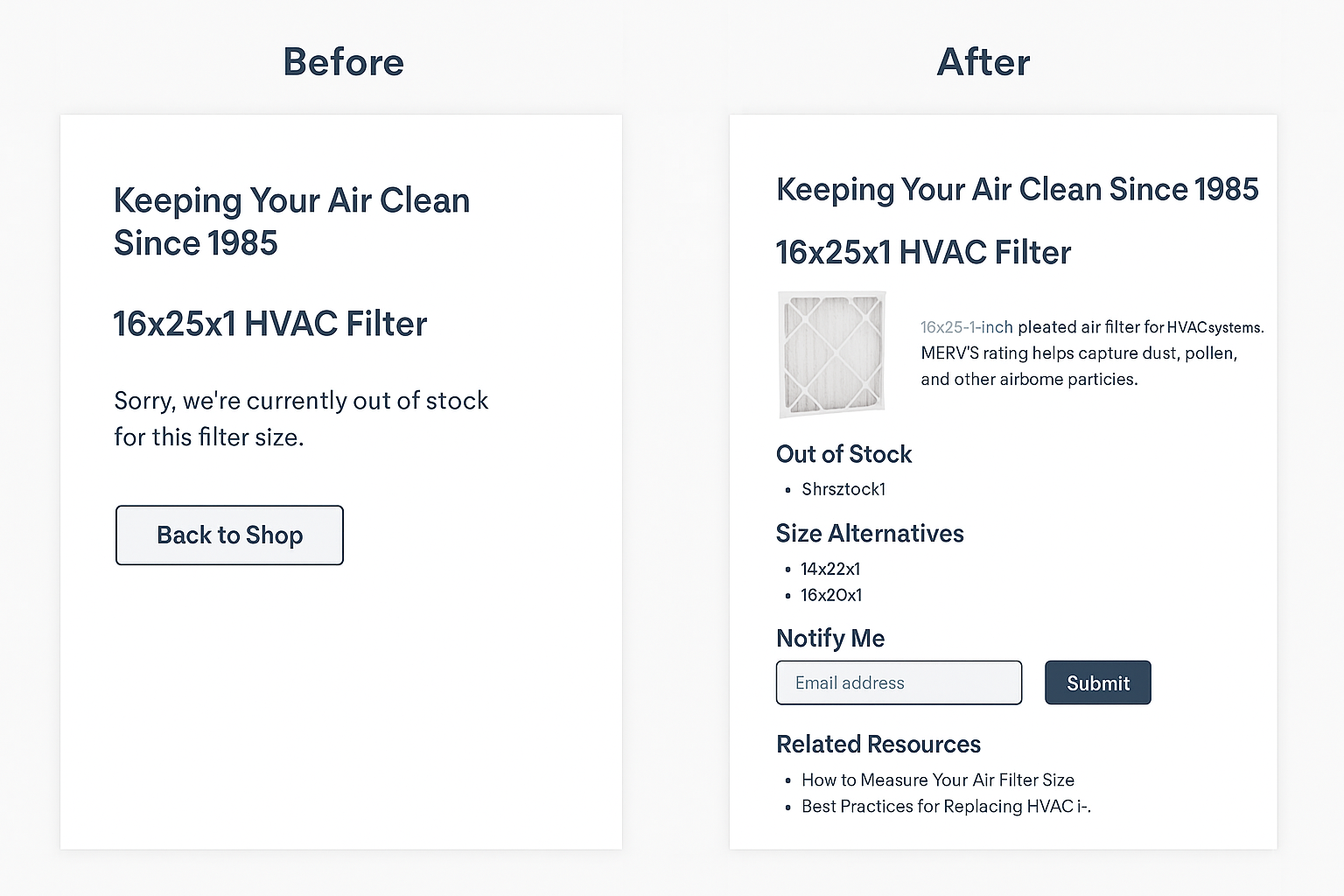 When someone visits that page, here’s what they see:
- A big hero banner with the company logo and tagline: “Keeping Your Air Clean Since 1985.”
- A short line of text that says: “Sorry, we’re currently out of stock for this filter size.”
- A “Back to Shop” button.
That’s it, no specs, no alternatives, no related resources, no instructions on what to do next.
Why Google Sees This as a Soft 404
Technically, the page returns a 200 “OK” status code, so from a server standpoint, it looks fine. But from a content standpoint, Google detects that there’s no substantive main content serving the page’s purpose.
The page exists, but it doesn’t fulfill the user’s intent of finding information or buying a filter.
Google’s systems may classify this as a soft 404, treating it as if the page didn’t exist. As a result, it’s removed from the index, even though it’s live.
How to Fix It
Instead of leaving the page nearly empty, the company could:
- Keep the product page live with full specifications, photos, and installation instructions.
- Clearly mark it as “Out of Stock” while offering similar in-stock sizes.
- Add a “Notify Me” form to capture leads.
- Link to related resources such as “How to Measure Your Air Filter Size” or “Best Practices for Replacing HVAC Filters.”
This way, the page still serves a clear purpose and offers value to the visitor, making it far more likely to remain indexed even if the item isn’t currently available.
Layouts That Hide the Main Event
Another way main content can get discarded is through layout choices that push the important material too far down or surround it with distractions. While Google is skilled at distinguishing between navigational elements, promotional blocks, and actual page purpose, it still draws conclusions based on prominence.
If the first things Google sees in the rendered page are banners, calls-to-action, or ads, it may not view your core content as central to the context of your website.
For example, a product page might feature an oversized hero banner and promotional offer, pushing critical specifications and descriptions well below the fold. In that case, Google could consider those specs less critical, or even treat them as secondary information rather than primary.
The Hidden Content Trap
Hidden, slow, or delayed loading content is another silent killer. If your most important text or visuals are tucked inside tabs, accordions, or sections that only load via JavaScript after a user clicks, Google might not see them at all, or may downgrade their importance.
While Google can execute JavaScript, it still prioritizes content that’s visible immediately on load.
The fix here is simple in concept but tricky in execution: make sure essential content is loaded into the DOM at the time of the initial render, and that it doesn’t require user interaction to appear.
Weak Semantic Structure
Even with visually clean layouts, poor HTML code structure can confuse Google’s systems about what matters most. Using generic <div> tags for everything instead of meaningful HTML elements like <main>, <article>, and <section> can strip away critical semantic context.
When Google sees well-structured HTML, it has more signals to determine which section of the page is the main content. Without these cues, Google relies more heavily on guesswork, which can lead to misidentification or even exclusion of important information from indexing.
Duplicate Content Dilution
Duplicate or near-duplicate pages present another indexing challenge. If Google detects multiple URLs containing the same or very similar main content, it groups them into a cluster and chooses one to index, often based on factors you can’t control. That means the page you’ve optimized and want indexed might be sidelined in favor of another version.
For businesses with product catalogs, this often happens when multiple product pages reuse the same descriptions with minor tweaks. Without canonical tags or consolidated content, you’re leaving the decision entirely in Google’s hands.
The Plagiarism Problem and Why It Backfires
While duplicate content within your site can dilute search signals, plagiarizing content from other websites, or unknowingly publishing scraped or stolen material, can be even more damaging.
Google’s indexing systems are designed to find the original source of a piece of content. When two or more pages have identical or near-identical main content, Google clusters them together and chooses one to index. That “one” is almost always the page it detected first, or the one with the stronger authority signals.
If your content was lifted from another site, Google is very unlikely to see you as the originator. Instead, your page will be treated as a duplicate and pushed aside, regardless of whether your version is better designed, better optimized, or even better formatted. In severe cases, plagiarism can trigger manual actions from Google, which can remove not only the copied page but also other parts of your site from search results.
Understanding Canonical Tags
What Is a Canonical Tag?
A canonical tag (<link rel="canonical">) is a piece of HTML code that tells search engines which version of a page is the preferred or “canonical” version when multiple pages have identical or very similar content.
It’s essentially a way of saying, If you see other pages with similar content, this is the one you should index and rank.
Canonical tags are particularly important when dealing with:
- Duplicate content within your own site
- Product pages with multiple sorting or filtering URLs
- Blog posts that appear in multiple categories
- Syndicated content published on third-party sites
How Canonical Tags Work
When Google crawls a page and sees a canonical tag, it:
- Reads the tag to find the canonical URL.
- Treats that canonical URL as the authoritative source of the content.
- Consolidates ranking signals (like backlinks) from the duplicate versions into the canonical page.
- Typically only shows the canonical URL in search results.
For example, if you have these three URLs:
example.com/product?color=red
example.com/product?color=blue
example.com/product
You could place a canonical tag on each version pointing to:
<link rel="canonical" href="https://example.com/product" />
This tells Google that example.com/product is the main page to index and rank.
How to Apply Canonical Tags
Canonical tags are placed inside the <head> section of the HTML for the page. Here’s the format:
html
<link rel="canonical" href="https://www.example.com/preferred-url" />
Best practices:
- Always use the full, absolute URL (including https:// and www if applicable).
- Make sure the canonical URL returns a 200 “OK” status code.
- Ensure the canonical version is accessible to crawlers (not blocked in robots.txt).
- Only point to a canonical URL that contains the same or very similar main content.
Why Canonical Tags Matter for Main Content Indexing
From Google’s perspective, a canonical tag helps avoid confusion about which page contains the “true” main content when duplicates exist. Without it, Google may pick the wrong version—or even ignore your preferred page entirely—splitting ranking power and reducing visibility.
If you’ve invested in high-quality, original content, a proper canonical strategy ensures that effort isn’t undermined by technical duplication or content syndication.
The Role of Semantic SEO in Supporting Main Content Indexing
You can have a perfectly optimized page from a technical standpoint, fast load times, clean code, and proper canonical tags, and still struggle to get your most valuable material indexed if Google can’t fully understand the meaning, context, and importance of that content. That’s where semantic SEO becomes essential.
Semantic SEO is about creating and structuring your content in a way that makes its topic, intent, and connections unmistakable, not just for human readers, but for search engines trying to decide what to index and rank. It moves beyond traditional keyword matching into building a network of meaning around your main content.
Building Context Through Language and Entities
When Google crawls your main content, it’s not just looking for exact-match keywords. It’s trying to understand the entities you mention (people, places, products, concepts) and how they relate to one another. This means:
- Entity-rich Writing: Incorporating relevant terms naturally, such as synonyms, related concepts, and industry-specific language.
- Explicit Connections: If your page is about “industrial water filtration,” you might also mention related entities like “reverse osmosis systems,” “contaminant load,” or “flow rate” to reinforce topic depth.
- Contextual Reinforcement: The more your main content speaks in the language of the topic, the easier it is for Google to classify it correctly.
By building this web of meaning into your main content, you make it easier for Google to see it as a comprehensive, authoritative resource.
Using Semantic Structure for Clarity
Semantic SEO isn’t just about the words, it’s also about how you structure them. HTML elements like <main>, <article>, <section>, and descriptive <h1>–<h3> headings give Google strong signals about which parts of your page are essential.
For example, a well-structured buyer’s guide might use:
- <h1>How to Choose the Right Water Filtration System</h1>
- <h2>Types of Industrial Filtration</h2>
- <h2>Factors That Influence System Selection</h2>
- <h2>Installation and Maintenance Requirements</h2>
Each heading logically breaks down the topic, which helps Google (and users) understand the scope and focus of the main content.
Reinforcing Authority Through Internal Linking
Internal linking is one of the most powerful semantic SEO tools for main content indexing. When related pages across your site consistently link back to a central resource with descriptive anchor text, it tells Google:
“This page is the hub for this topic.”
For example, if your product pages, blog posts, and FAQs all link to your filtration buyer’s guide using relevant phrases (“industrial filtration system selection guide”), you create a semantic cluster that elevates the main content’s importance in Google’s eyes.
Strategic Use of Structured Data
Structured data (schema markup) can help Google interpret your content more precisely. Using schema that matches the role of your main content—such as Article, Product, or FAQ—adds an extra layer of meaning.
But restraint matters. Overloading a page with irrelevant or excessive markup can backfire, causing Google to ignore it entirely. The goal is to complement your main content, not clutter it.
Why Semantic SEO Improves Indexing Outcomes
Semantic SEO strengthens main content indexing because it:
- Removes ambiguity: Google doesn’t have to guess what the page is about.
- Builds topical authority: Related content, entities, and internal links reinforce the central topic.
- Improves ranking potential: Well-defined, well-connected content is more likely to be indexed prominently and matched to relevant queries.
When combined with the technical strategies in earlier sections, semantic SEO ensures that your main content is not only detected but also understood—and given the priority it deserves in search results.
Conclusion: Make Every Page’s Purpose Crystal Clear
Google’s renewed emphasis on main content indexing is a wake-up call for marketers: it’s not enough to publish content—you have to make its purpose obvious to both humans and search engines.
If your most important material is buried in the noise, hidden behind design choices, or duplicated across your site, Google may never see it the way you do. The result? Lower visibility, missed opportunities, and wasted effort.
By placing your main content front and center—structurally, semantically, and contextually—you give it the best possible chance to be indexed, ranked, and found by the people who need it.
If you’re unsure whether your site’s pages are sending the right signals, we can help. Contact us with your questions and let’s make sure your main content is working as hard for your business as you are.